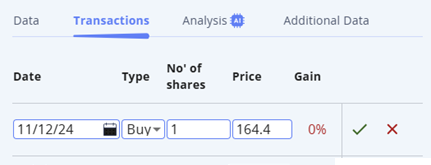
The virtual investment portfolio can be manually synchronized to an existing portfolio - by adding the securities to My Holdings and adjusting holdings and past transactions in the Transactions sub-tab:
- Create a new portfolio in TASE+
- Add the securities to the portfolio
- Go to the "My Holdings" page
- Click on the security
- In the section that appears, select the "Transactions" button and enter past transactions including date, type of operation "buy/sell", number of shares, and price. When finished, confirm by clicking on the green V.
- This must be performed for each security you add to the Smart Portfolio.